EasyWeather

EasyWeather

Home  ›  Home & Hobby  ›  Other
trusted
DOWNLOAD 1.37 MB
3  (2 votes)
2.9
Questions & answers (6/1)
Wiki
Suggest a correction

Video tutorial & screenshots

  • Setup Window
  • Scope Window
  • History Data Window
  • Graph Window
  • Alarm Window
  • About Window
  • Main Window

Editorial review

All comments (4)

Mario Procione Senior editor

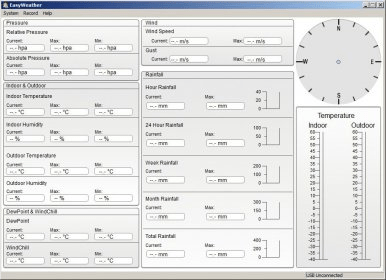
EasyWeather is an application designed to remotely display meteorological information provided by the ProWeatherStation, on any PC running Windows operating system. This program allows users to setup alarms, as well as to configure the way information is displayed into charts. You should bear in mind, however, that EasyWeather may only be used if ProWeatherStation is connected with an USB cable to your computer.
EasyWeather is a PC program rich in features, which grants you access to numerous information regarding weather conditions at a given moment. Moreover, it allows you to choose from various units of measures for pressure, wind speed, as well as rainfall. All these settings are included into the Setup Main Menu. Furthermore, by accessing this menu, users are able to apply settings to the display format, such as the indoor and outdoor temperature, and also enable alarms for specific weather conditions. Another advantage of using this application arises from the data logging option. This option enables you to store information about weather conditions at a given moment in the “History Data” menu. These details may, then, be displayed in the format of either 2D or 3D graphs.

Altogether, EasyWeather is a feature-rich program, which gives users convenient access to real-time information about meteorological conditions. It also provides them with the possibility to structure and display them into graphs, in order to better comprehend the relevant statistics.

Pros

  • Feature-reach
  • Highly-configurable
  • Easy to use

Cons

  • None
This software was checked for viruses 6 months ago and was found to be clean. Click here to see antivirus report.
trusted
DOWNLOAD 1.37 MB
 

Publisher's description

EasyWeather is an advanced yet simple to use windows software that allows real time remote display of the ProWeatherStation. It can be used to setup the weather station parameters and alarms. It also is used for data logging and data export as well as viewing collected data in various built in graph formats. The weather station controller needs to be connected to the PC with a USB cable for real time display.

Latest comments

  All comments (4)
  • 0
    Ion 8 months ago
    — Good for a free program.
    Pros: Works well. Setup is relatively straight forward.
    Cons: Sometimes has trouble connecting. Displays are somewhat simple. Does not have ability to alter range max & min on graphs, so often the data is almost a flat line on the bottom of the garph.

    I live in a very dry area, consequently rainfall which is minimal becomes near a flat line, as do some other readings. If I could alter the range displayed on the graph it would make more sense. Also rain is portrayed as cumulative, rather than either cumulative or individual showers. Peak outdoor temperature shows as 30°C in mid winter @ 35° South; I think not.
    Can't wait for the next updated version!

    • 0
      Will9 8 months ago

      This works for me :- In graph view, place the mouse pointer just above and to the left of the portion you want to enlarge, then drag an imaginary oblong to just below and right of the portion you are interested ( at this point no change to the screen is seen) on releasing the mouse button, the selected area is enlarged.

  • 0
    jerry ffsha 11 months ago
    — really useful and educative
    Pros: easy to use, accurate, tells all
    Cons: can not get full screen, would like to read from an other computer when I am away.

    I find this a very informative program. It is informative to the point that people want to see it when they drop in for a drink. As a gardener I would like to see moon phase included, for good planting. When I travel abroad I would like to check on ..my.. weather back home. especially as it could inform me of floods or high winds here in the South of Portugal and allow me to request neighbors to check any potential problems from climate. But all in all it is a great..software/hardware..combination... I would highly recommend it..

    • 0
      Guest 2 months ago

      I have my machine configured to allow remote desktop, so I can access the program from any Windows.


loading
Download Software Informer Client